

Free Gemini Visibility Tracker
Check if Google Gemini mentions your brand and who it names instead.
- Free, no credit card.
- Report in minutes, link sent to your email.
What is Gemini SEO?
Gemini SEO is getting your brand recommended by Gemini, Google's AI assistant, when people ask it what to use or buy.
Gemini lives in its own app and on gemini.google.com, on Android phones, in Chrome and inside Gmail and Docs for Workspace users. Asked to compare options or suggest a product, it replies with a short list and the reasons behind each pick.
It reads the same Google index as Search, but it does not return the same results: a brand on page one of Google can still be missing from Gemini's shortlist. A Gemini visibility tracker shows which side of that line you are on. To follow Gemini alongside every other AI engine, day by day, there is the AI visibility tracker.
How the Gemini visibility tracker works
No Google account to link and nothing to install.
- yourbrand.comCheck my brand1
Enter your domain
We read your site and work out your market, the people who buy from it and your closest competitors.
- recommend payroll software for a startup
- payroll for a company hiring in two states
- cheaper alternative to a payroll provider
2We write the prompts
Ten requests a buyer would give Gemini: recommend something, compare two options, find a cheaper alternative. Your brand never appears in them.
- recommend payroll software for a startup
- payroll for a company hiring in two states
- cheaper alternative to a payroll provider
3Gemini answers
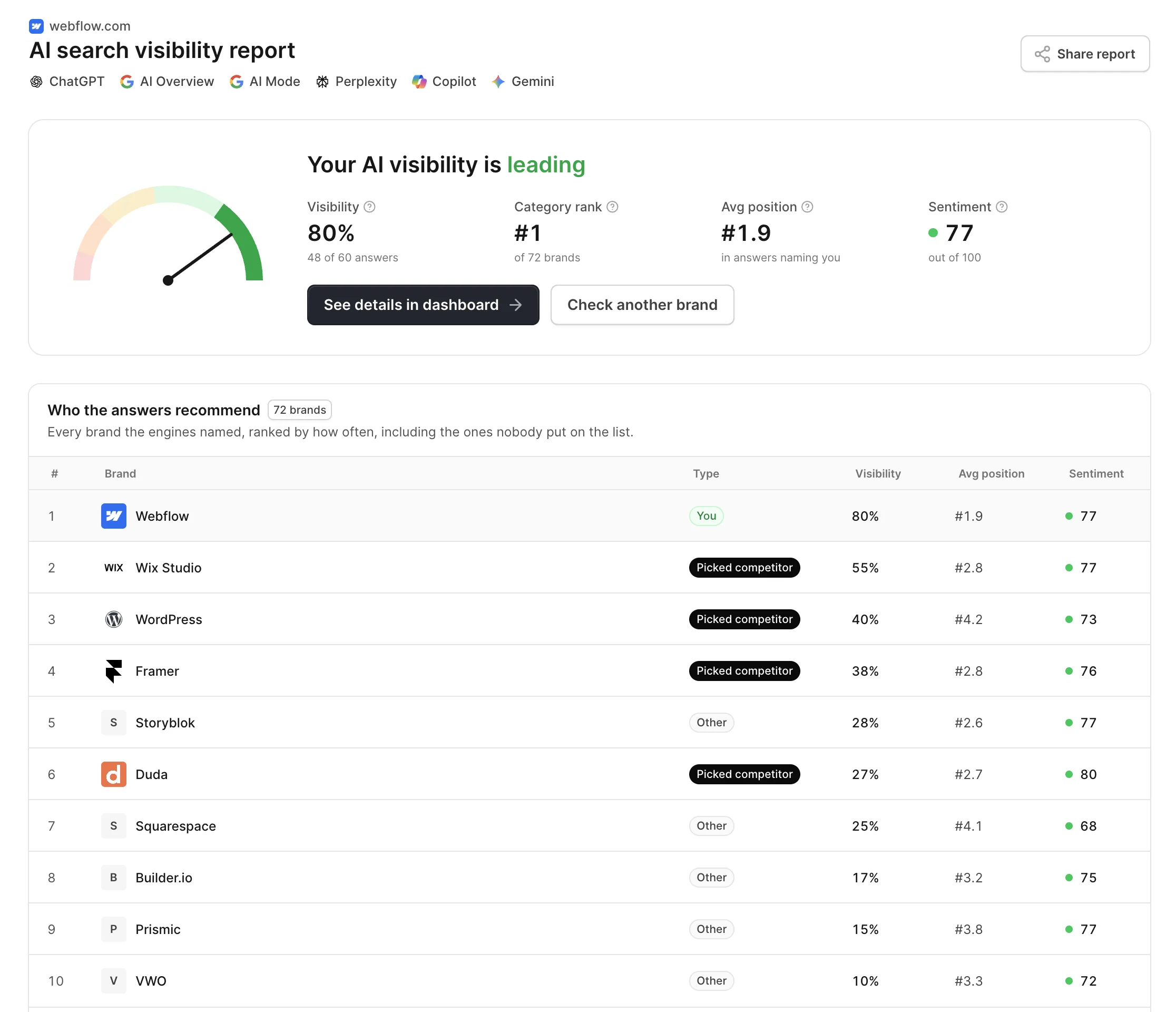
Each prompt runs in Gemini. We read the reply for the brands it names, their order and the sources it shows, and send the report link to your email.
- Free, no credit card.
- Report in minutes, link sent to your email.
What the Gemini rank tracker shows
Read from Gemini's replies to your ten prompts, nothing estimated.
How often you are named
The share of Gemini's replies that include your brand, counted across all ten prompts.
Where you land
Your place in the list when Gemini names you, since the first two or three picks get the attention.
How Gemini talks about you
A sentiment score from 0 to 100 for your mentions: a clear pick, a maybe, or a warning.
Who Gemini names instead
The brands on Gemini's shortlists for your category, in order of how often they appeared.
The sources behind it
The pages Gemini linked when it checked Google Search, and the brands those pages helped.
Gaps to close
Prompts where Gemini recommended a competitor and not you, listed so you know where to start.
Why Gemini is not just Google Search
Same company, same index. A different product, and a different way to win.
A conversation, not a results page
Gemini answers in a chat, and buyers follow up. There is no page of links to rank on, only the reply.
Grounded, or from memory
For current questions Gemini checks Google Search and shows sources. For others it answers from what the model knows.
Same index, different picks
Ranking well in Search makes you findable to Gemini. It does not decide whether Gemini recommends you.
Google's own surfaces count
YouTube videos, Maps listings and product data from Google can feed an answer, not only web pages.
How Gemini uses Google Search to build answers
When a request needs facts it does not hold, Gemini grounds its reply in Google Search: it runs searches, reads the results and writes an answer, often with links to where it found things. The rest comes from the model's own knowledge.
- Google's index first
- What Gemini finds comes from Google Search, so the basics apply: a page must be crawlable and indexed. Google-Extended in robots.txt decides whether Gemini may use it, and does not touch your Search rankings.
- One prompt, many searches
- A request like the best tool for a small remote team becomes several searches. Pages that answer those narrower questions get read.
- Beyond web pages
- Gemini can draw on Google services such as YouTube and Maps, so a strong video or a complete business listing can surface in a reply.
- What the model knows
- Brands that are written about widely and consistently are named even when Gemini does not search, because the model already associates them with the category.
Gemini SEO: how to get recommended
Work on what Gemini reads: Google's index, Google's own surfaces and what others say about you.
Pick the prompts to win
Use the report's list of prompts where Gemini chose a competitor. Each one names the brands you need to displace.
Be easy for Google to use
Keep key pages indexed and fast, and do not block Google-Extended if you want Gemini to be able to draw on them.
Fill in Google's surfaces
A complete Business Profile, product data and useful YouTube videos give Gemini more of you to find than your site alone.
Earn independent mentions
Reviews, comparisons and articles that describe you clearly teach the model where you fit, whether or not it searches.
Frequently asked questions
Gemini SEO is the work of getting your brand named in Gemini's answers when buyers ask it for recommendations. It builds on regular Google SEO, since Gemini reads Google's index, and adds what an assistant cares about: pages that answer specific questions, a presence on Google's own surfaces, and consistent descriptions of your brand across independent sites.
Gemini does not show a ranked list of links, so ranking means being recommended and appearing early in the reply. Start with the prompts where competitors are named instead of you, make sure the pages that answer those prompts are indexed and not blocked for Gemini, and build mentions on the review and comparison sites it cites.
No. Both are Google products built on Gemini models and Google Search, but AI Overviews is a summary shown on a Google results page, while Gemini is a chat assistant people talk to directly. The same question can get different brands in each, which is why AskWatch checks them as separate engines.
It reports what a Gemini rank tracker would: whether Gemini names you, your position in its answers and who it names instead. It does that once, for ten prompts, rather than every day. AskWatch runs the same prompts on a schedule when you want to follow them over time.
Run this check for a snapshot of how Gemini sees your brand today. Gemini brand monitoring over time means repeating the same prompts on a schedule and comparing how often you are named, where you appear, how you are described and which sources Gemini relies on, so changes show up before they cost you buyers.
Other free tools
- Open tool
AI Visibility Checker
Check if ChatGPT, Gemini, Perplexity and Google AI name your brand, and get your AI visibility score.
- Open tool
AI Overview Checker
See if Google AI Overviews cite your site, which of your pages they pick, and who is cited instead.
- Open tool
Perplexity Visibility Tracker
Track whether Perplexity cites your site and names your brand in its answers.
- Open tool
ChatGPT Visibility Tracker
See if ChatGPT mentions your brand and where you rank in its answers.
- Open tool
Google AI Mode Visibility Tracker
See if Google AI Mode names your brand and which pages it cites.
- Open tool
Copilot Visibility Tracker
See if Microsoft Copilot mentions your brand and cites your site.
- Open tool
AI Visibility Chrome Extension
Check any site you open in one click: 28 checks of whether AI crawlers can read it and what buyers will find there.
- Open tool
llms.txt Generator
Write an llms.txt for any site from its sitemap and page descriptions. No model, no watermark, checked against the spec.
- Open tool
llms.txt Checker
See whether a site's llms.txt exists, follows the spec, has live links and is not blocked for AI crawlers.
- Open tool
robots.txt Generator
Create a robots.txt in a minute: block AI training, stay in AI search, add paths and your sitemap. Tested before you download it.
- Open tool
robots.txt Tester
Test any URL against robots.txt for Googlebot and 20+ AI crawlers, and find the line that decides each one.
- Open tool
AI Crawlers List
Every AI crawler with its user agent, IP list and robots.txt token, and whether your site lets each one in.
- Open tool
Google Search Console MCP
Ask Search Console in plain language from Claude, ChatGPT, Cursor or Claude Code. No Google Cloud project.
Check your brand in Gemini for free
Enter your domain. Your report is ready in a few minutes.
- Free, no credit card.
- Report in minutes, link sent to your email.