

Free AI Mode Tracker
See if Google AI Mode names your brand and which pages it cites.
- Free, no credit card.
- Report in minutes, link sent to your email.
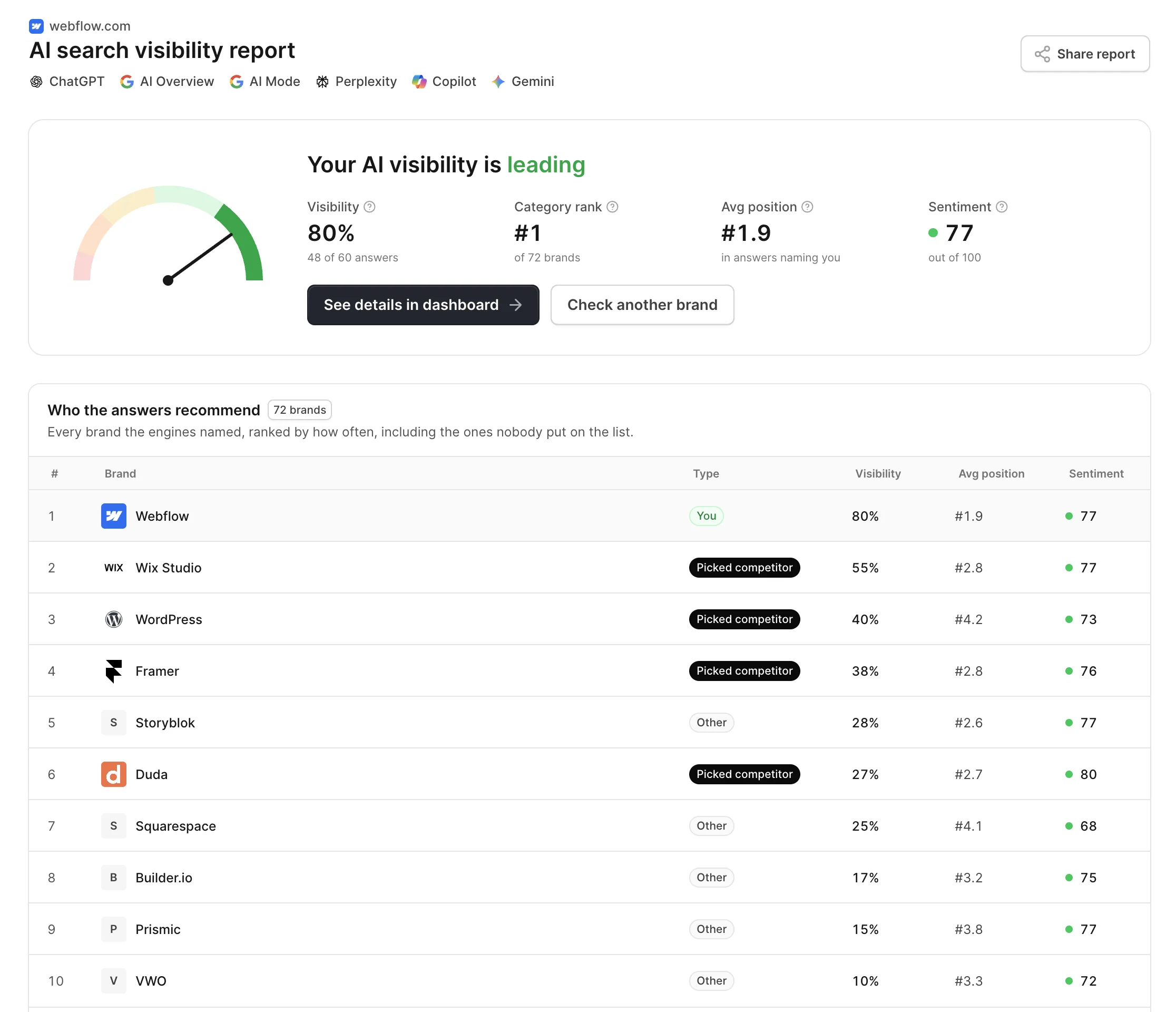
What is Google AI Mode?
Google AI Mode is a conversational mode of Google Search: instead of a page of results, it answers with an AI-written response, links to its sources and room for follow-up questions.
Google opened it to everyone in the US in May 2025, running on a custom Gemini model, and has been adding countries and languages since. People reach it from the AI Mode tab in Search, or by going deeper from an AI Overview, and they use it for the longer, specific questions a results page handles badly.
For a brand, Google AI Mode visibility comes down to whether that answer names you and links to you. An AI Mode tracker asks the questions your buyers bring to it and reports what comes back. For every AI engine at once, followed daily, there is the AI visibility tracker.
How the AI Mode tracker works
No Search Console, no Labs sign-up, nothing to install.
- yourbrand.comCheck my brand1
Enter your domain
We read your site to see what you offer, who it is for and which brands buyers weigh you against.
- payroll for 30 staff across three states
- payroll that also handles benefits
- switching payroll providers mid year
2We write the questions
Ten specific questions of the kind people bring to AI Mode, with a budget, a team size or a constraint in them. Your brand is not named.
- payroll for 30 staff across three states
- payroll that also handles benefits
- switching payroll providers mid year
3AI Mode answers
Each question runs in Google AI Mode. We read the answer for the brands it names, their order and the pages it links, and email you the report.
- Free, no credit card.
- Report in minutes, link sent to your email.
What the AI Mode checker shows
Six readings from AI Mode's own answers, one report.
Named or not
In how many of AI Mode's answers your brand appears. Your visibility, as a share of ten.
Rank in the answer
Where AI Mode places you among the options it lists, when it lists you at all.
Your pages as sources
Whether AI Mode links to your site next to its answer, and which of your pages it used.
Rivals in AI Mode
The brands AI Mode brings up for your category, ordered by how often it named them.
Every linked page
The full set of pages AI Mode cited across your questions, and whose case each one made.
Tone
How AI Mode frames your brand, from 0 to 100, from first choice to the one with drawbacks.
What an AI Mode rank tracker measures
AI Mode is still Google Search, but the thing you rank in is an answer, not a list.
Fan-out, not one query
AI Mode splits a question into many related searches and reads them all. You can be used without ranking for the question itself.
A thread, not a single search
Buyers ask a follow-up and AI Mode keeps the context. The brands that stay in the answer after it are the ones that count.
Many links, not ten
An answer can carry a long list of sources beside it. Being one of them is the win, whatever your position in classic results.
Answer first, links second
The reader gets the recommendation before any link. A brand named in the text is seen even if its site is not clicked.
How Google AI Mode differs from AI Overviews
Both are Google, both run on Gemini models over Google Search, and they often get confused. They behave differently, name different brands, and need to be checked separately.
- Where it shows up
- AI Overviews appear on their own, on top of a normal results page, for some searches. AI Mode is a separate mode people choose, and its answer replaces the results.
- Which questions go there
- Overviews summarize a search. AI Mode is built for longer questions with several conditions, the kind people used to split into three searches.
- How far it searches
- AI Mode fans a question out into more searches and reasons over more pages, so it tends to cite a wider set of sources than an Overview.
- What happens next
- An Overview is one answer. AI Mode keeps a conversation going, so follow-up questions can add brands or drop them from the shortlist.
AI Mode SEO: how to show up
Google says the foundations of Search still apply. What changes is which questions your pages have to answer.
Start with the questions you lose
The report shows where AI Mode named competitors and not you. Those questions tell you which sub-topics you are missing.
Cover the sub-questions
Because AI Mode fans out, write pages for the narrower questions inside a big one: pricing, fit for a team size, a direct comparison.
Stay eligible for Search
Pages have to be indexed and allowed in snippets to be shown. Google says no extra markup or special files are needed for AI Mode.
Show up in the sources it reads
Reviews, comparisons and discussions cited in your report are where AI Mode forms its view of your category. Be in them.
Frequently asked questions
Google AI Mode is an AI search experience inside Google Search. You ask a question, often a long and specific one, and it replies with a written answer built from many searches it runs in the background, with links to its sources and the option to ask follow-up questions in the same thread.
Enter your domain at the top of this page. The tool writes ten questions a buyer in your category would ask, runs them in Google AI Mode and reports how often your brand is named, where it sits, which of your pages are linked and who appears instead. By hand, you would ask each question in AI Mode yourself and note every brand and source.
The foundations are the same: Google says pages need to be indexed and eligible for snippets, with no special markup required. The difference is in what gets you used. Google AI Mode SEO rewards pages that answer the narrower questions a big query fans out into, clear statements of who you serve, and mentions on the third-party pages AI Mode cites.
Both names are used for the same need. This tool works as an AI Mode checker: it runs your questions once and reports what AI Mode says today. Tracking the same questions every day, to see changes over time, is what AskWatch does on a schedule.
AI Mode launched for all users in the US in May 2025, expanded in English to more than 180 countries and territories in August 2025, and has added languages since. Google keeps extending it, so its Search help pages have the current list for your country and language.
Other free tools
- Open tool
AI Visibility Checker
Check if ChatGPT, Gemini, Perplexity and Google AI name your brand, and get your AI visibility score.
- Open tool
AI Overview Checker
See if Google AI Overviews cite your site, which of your pages they pick, and who is cited instead.
- Open tool
Perplexity Visibility Tracker
Track whether Perplexity cites your site and names your brand in its answers.
- Open tool
ChatGPT Visibility Tracker
See if ChatGPT mentions your brand and where you rank in its answers.
- Open tool
Gemini Visibility Tracker
Check if Google Gemini mentions your brand and who it names instead.
- Open tool
Copilot Visibility Tracker
See if Microsoft Copilot mentions your brand and cites your site.
- Open tool
AI Visibility Chrome Extension
Check any site you open in one click: 28 checks of whether AI crawlers can read it and what buyers will find there.
- Open tool
llms.txt Generator
Write an llms.txt for any site from its sitemap and page descriptions. No model, no watermark, checked against the spec.
- Open tool
llms.txt Checker
See whether a site's llms.txt exists, follows the spec, has live links and is not blocked for AI crawlers.
- Open tool
robots.txt Generator
Create a robots.txt in a minute: block AI training, stay in AI search, add paths and your sitemap. Tested before you download it.
- Open tool
robots.txt Tester
Test any URL against robots.txt for Googlebot and 20+ AI crawlers, and find the line that decides each one.
- Open tool
AI Crawlers List
Every AI crawler with its user agent, IP list and robots.txt token, and whether your site lets each one in.
- Open tool
Google Search Console MCP
Ask Search Console in plain language from Claude, ChatGPT, Cursor or Claude Code. No Google Cloud project.
Check your brand in AI Mode for free
Enter your domain. Your report is ready in a few minutes.
- Free, no credit card.
- Report in minutes, link sent to your email.